Jump to main content
Pracsoft by Telstra Health logo
Knowledge Centre
  • Get Started
  • Appointment Management
  • Patient Management
  • Communications
  • Finance
  • Administration
  • Reports
  • Integrations
  • Support
Index
Support
Version 4.4
V4.4 (Current) V4.3a V4.3
  1. Home
  2. Finance

    Manage accounts, fees, claiming, billing and banking in Pracsoft.

  3. Accounts and Receipts

  4. Printing Accounts and Receipts

  • Finance

    Manage accounts, fees, claiming, billing and banking in Pracsoft.

    • Recording Visits

    • Online Claiming

      Send Bulk Bill claims to Medicare Australia Online or Department of Veterans' Affairs (DVA) claims.

    • Accounts and Receipts

      • Adjusting Account Fees

        Adjust an account fee if a visit has been over-charged or under-charged.

      • Changing an Account's Associated Practitioner

      • Changing Payment Types

      • Credit Accounts

      • Adding Footer Text to Accounts and Receipts

      • Held Accounts

      • Issuing Receipts

        Issue receipts after a patient's visit.

      • Payments and Receipts

        Record payments and receipt-off accounts.

      • Printing Accounts and Receipts

        • To Print an Account or Receipt Copy

          Print an account or receipt.

        • To Print the Details of a Receipt

          Print the details of a receipt.

        • Printing a Patient's Account History

          Print a patient's history of accounts paid and accounts owing.

        • Printing One-off Statements

          Print a one-off statement of all monies owing for a particular patient.

        • Printing Held Accounts

          Print held accounts.

      • Printing and Emailing Invoices, Receipts, and Statements

      • Reversing Accounts

        Reverse one or more of the items in an account.

      • Reversing Receipts

      • Searching for Accounts

      • Writing-off Accounts

    • Banking

    • Fees

      Pracsoft provides you with a Standard Fee list of over 100 commonly used items.

    • Institutional Payers

Printing Accounts and Receipts

Before you begin

The following information explains how to print a copy of a patient's visit (account) or receipt details.

Below are steps for printing;

  • An Account or Receipt Copy
  • The Details of a Receipt
  • A Patient's Account History
  • One-off Statements
  • Held Accounts

Procedure

  1. Locate and open the record of the patient you want to edit.
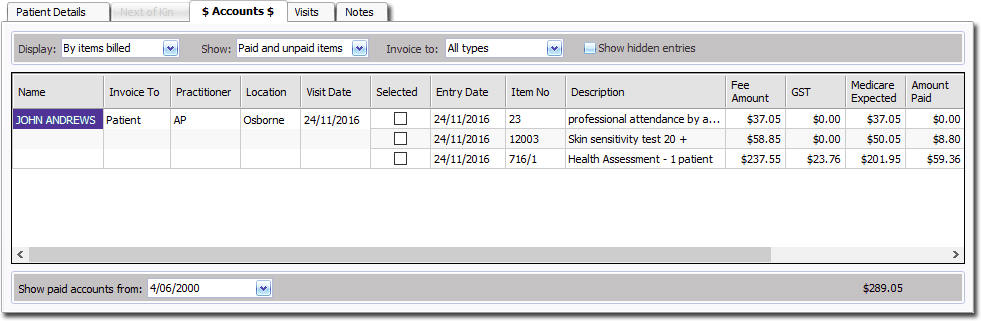
  2. Select the Accounts tab.

Results

  • To Print an Account or Receipt Copy
    Print an account or receipt.
  • To Print the Details of a Receipt
    Print the details of a receipt.
  • Printing a Patient's Account History
    Print a patient's history of accounts paid and accounts owing.
  • Printing One-off Statements
    Print a one-off statement of all monies owing for a particular patient.
  • Printing Held Accounts
    Print held accounts.
© 2026 Telstra Health