
Display SMS Message Status in the Appointment Book
Display the status of SMS messages to patients and their replies in the Appointment Book.
About this task
Procedure
-
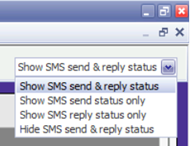
In the Appointment Book, use the menu at the top right to select the information
about SMS messages that you want to display. The options are:
- Show SMS send & reply status
- Show SMS send status only
- Show SMS reply status only
- Hide SMS send & reply status
Results
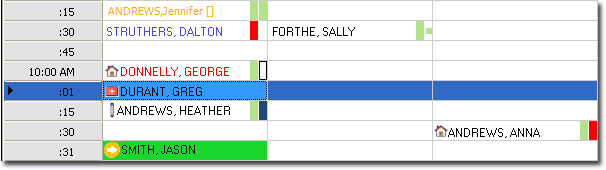
Coloured blocks next to the patient names show the status of sent SMS messages, for
example:
| Status | Description |
|---|---|
 |
A message has been sent, but you are not waiting on a reply. |
 |
A message has been sent, and you are waiting on a reply. |
 |
A message has been sent, and the patient has replied indicating that they have declined the appointment. |
 |
The message failed to send. |
 |
A message has been sent, and the patient has replied, indicating that they accepted the appointment. |
 |
A message has been sent, and the patient has replied, but their reply message is deemed uncertain. |