
Payments and Payment Types
Payment types define the ways of making payments for accounts and visits.
When Recording a Visit, you record the payment made, and in some cases the details of the payment type so you can issue a receipt. Payment types are managed via the Payment Types tab of Global Settings.
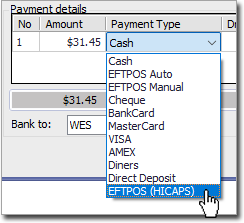
The payment types set up in Global Settings can be selected when recording a patient's visit to the practice, for example:
Some payment types have additional settings, for example, to connect to a third-party EFTPOS system. Select a payment type to display the additional settings on the right of the Payment Types tab.