
Appointment Sessions Types
Use appointment session types to build session plans showing times when appointments can be scheduled for each practitioner.
Within an Appointment Book, you can create a session plan in which appointments can be scheduled, for each practitioner.
This image shows an appointment book session plan:
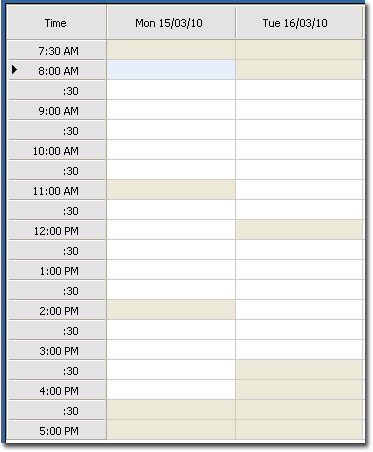
On Monday, the practitioner has three sessions:
- 8:30 AM to 11:00 AM
- 11:30 AM to 2:00 PM
- 2:30 PM to 4:30 PM
On Tuesday, they have two sessions:
- 8:30 AM to 12:00 PM
- 12:30 PM to 3:30 PM
- Standard sessions
- A normal session when a practitioner is available to take appointments. There are
two types of standard sessions:
- Default sessions, which are the default for the entire Appointment Book. Default sessions always override practitioner-specific sessions.
- Practitioner-specific sessions, when the practitioner will be available to take appointments.
- Special sessions
- Also referred to as temporary sessions, special sessions are practitioner-specific sessions, when the practitioner is available for different sessions over a range of dates. Special sessions override standard sessions for the practitioner.
- Days absent
- The days on which a practitioner will usually be absent.
For example, suppose your practice has six practitioners.
Your practice runs two default standard sessions per day - 9:00 AM to 12:00 PM and 12:30 PM to 4:00 PM.
In the Session Details window for your Appointment Book, record the default sessions for each day. Because you have set up default standard sessions, it is not necessary to set up practitioner-specific standard sessions. Each practitioner follows the default standard plan.
A new practitioner then joins the practice. Unlike the other practitioners, they are only available until 3:00 PM each day.
- Delete all of the default standard session plans for each day.
- Record practitioner-specific standard session plans for each day for the new practitioner and all the other practitioners.