
Appointment Status
Coloured text shows the status of a patient's appointment in the Appointment Book.
In the Appointment Book, the patient's name can be displayed in different coloured text to indicate the status of their appointment. For example, the name of a patient currently in consultation can be displayed in red text, or another in the Waiting Room can be displayed in blue.
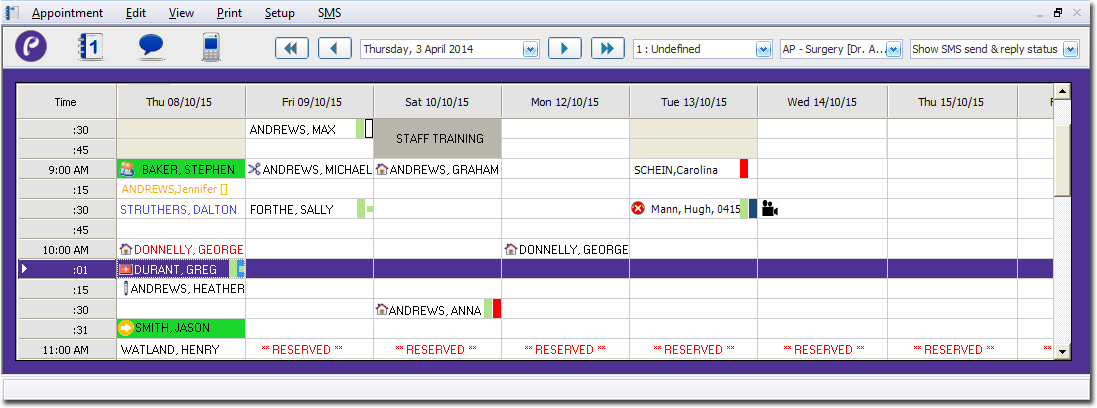
To indicate the status of a patient's appointment in the Appointment Book, either:
- Right-click the appointment and select the status from the options in the menu.
- Click the appointment and type the shortcut key combination.
| Status | Text Colour | Keyboard Shortcut | Meaning |
|---|---|---|---|
| Booked | Black | Ctrl+K | The appointment is scheduled but the patient has not arrived. |
| Waiting | Blue | Ctrl+W | The patient has arrived and is in the Waiting Room. |
| No-show | Orange | The patient did not arrive in time for their appointment. | |
| In Consultation | Red | Ctrl+I | The patient is in consultation. This status is most frequently assigned by the practitioner. If they also have Clinical on their computer, assigning the In Consultation status automatically opens the patient record in Clinical. |
| Gone | Grey | Ctrl+G | The patient's consultation has ended. |