
Deactivating Practitioners in the Appointment Book
For a given appointment book, indicate that a specific practitioner has become inactive.
Before you begin
Flagging a practitioner as inactive will remove them from the list of available practitioners to display appointments for (and subsequently hide all their scheduled appointments).
A practitioner can be flagged 'inactive' for one appointment book, but still remain available to others. Note that you can also simply hide a practitioner, without completely removing them and their scheduled appointments from the appointment book.
Procedure
-
Open the Appointment module. Either:
- Click
 Appointment
Book.
Appointment
Book. - Selecting .
- Click
-
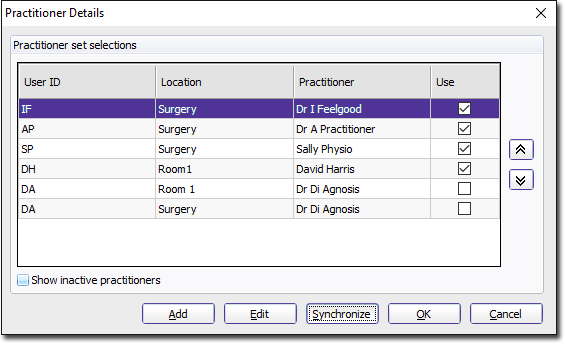
In the Practitioner Details window, select the practitioner
you want to make inactive.
-
In the Add Practitioner window, set Mark As
Inactive.
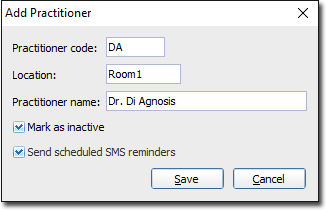
Note:If you set a practitioner to inactive, you will also hide all appointments currently scheduled for them.
Results
You will be returned to the Practitioner Details window, where you will notice the practitioner is no longer available.
What to do next
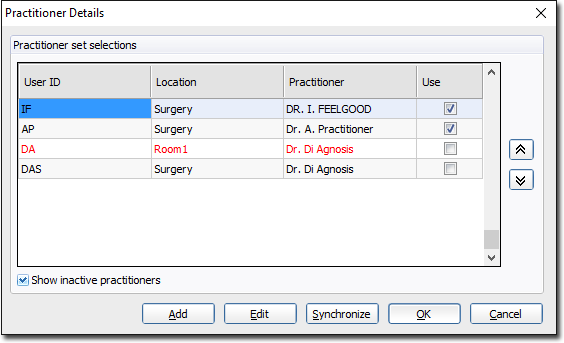
To reactivate a practitioner, edit their record again, and deselect Mark As Inactive.