Add fit-in appointments for patients without an appointment who are seeking medical
attention.
Before you begin
A fit-in appointment is one that is scheduled inbetween two standard, booked
appointment slots. A fit-in appointment may be required if for example a patient arrives
unannounced and needs urgent attention. A fit-in appointment may also occur if a patient
scheduled an appointment online, and it then conflicted with an appointment
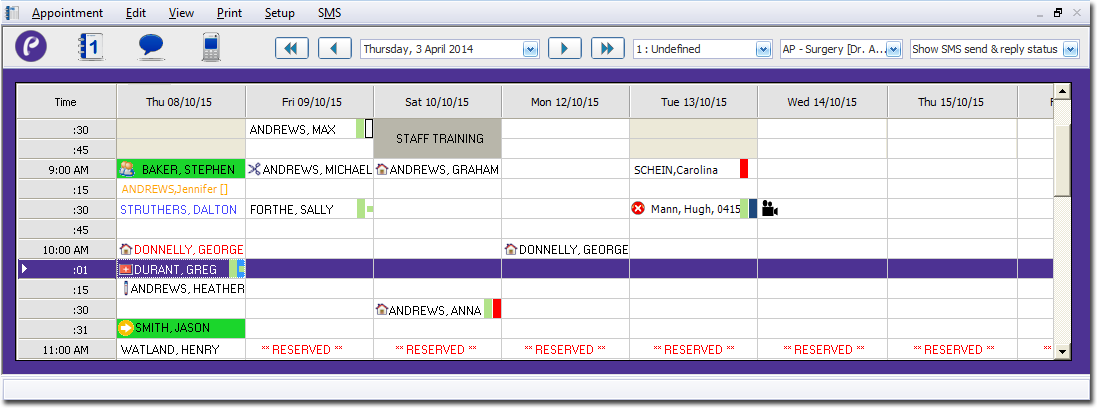
simultaneously scheduled by your staff at the practice. In the example below, a fit-in
appointment has been created for Greg Durant, between George Donnelly's appointment at
10:00 and Heather Andrews' appointment at 10:15.
Procedure
-
Open the Appointment module, either:
- Click
 Appointment Book
- Select .
-
If you have multiple Appointment
Books in use, select the Appointment Book you want to use via the
associated drop-down list.
-
From the Practitioner list, select the practitioner to whom you want to assign the
patient. The image above indicates that the appointment schedule for Dr. A
Practitioner is currently selected.
-
Select a time slot in the date/time matrix in which to schedule the
appointment.
-
To add a fit in appointment:
-
Select the time slot prior to where you want to schedule the fit-in
appointment.
In the example, we needed to schedule a fit-in appointment for Greg Durant,
when he arrived unannounced on Thursday at 10:00. Prior to his arrival, there
were already appointments scheduled for 10:00 (George Donnelly) and 10:15
(Heather Andrews), and there were no available appointment slots between those
times; we needed to fit in Greg's appointment after George's (because George
was already being seen to), but before Heather's. Therefore, the slot prior to
the fit-in appointment was George's at 10:00, so this is the slot we
selected.
-
Then either:
Results
A new appointment is scheduled for your patient one minute after the last 'standard'
appointment slot commenced. Fit-in appointments are always scheduled for one minute after
the last standard appointment. In the example above that the fit-in appointment is
scheduled for 10:01.
What to do next
Continue to create the appointment, as if it were a standard appointment.