
Step 1: Selecting Claims
Before you begin
Procedure
-
Open the Online Claiming window:
- From the Batch Bulk Claims menu, click Send to open the Online Claiming window, or
- From the Pracsoft Waiting room, select .
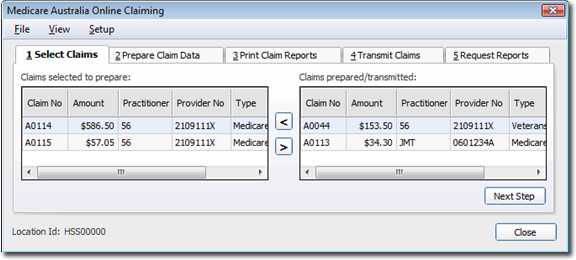 Note:This window will only display claims for practitioners flagged as using Online Claiming or active within Pracsoft.
 - Left-hand side: Claims that have been batched but not prepared or sent.
- Right-hand side: Claims that have been prepared or transmitted.
- Claims can be moved to the right or left of this screen by highlighting the claim and clicking the centre arrows or simply double-clicking the claim.
Results
What to do next
For the advance options of the Select Claim tab, select the claim,
and right-click:
- Print the Claim Details: - a report is generated of all voucher details within the selected claim.
- Reset Bulk Claim Status: - if the claim has been transmitted to Medicare, the claim status may need to be reset. This can only be done by a 'Level 9' user, and the password generated by MedicalDirector Customer Service. The password is generated on the Claim No. and the date the claim was transmitted to Medicare. This information is included in the reset bulk claim status window.